Skip to content
Simplylearn a part of Norsk Interaktiv
SimplyLearn_white
SimplyLearn_white
  • Case Studies
  • Products
  • Contact
  • EN
  • NO
Simplylearn a part of Norsk Interaktiv White
  • Case Studies
  • Blog
  • Simplylearn demo site
  • About us
  • Book a demo
  • Products
  • SimplyLearn
  • SimplyMeet
  • Premium extensions
  • Ready made courses
  • Customised solutions
  • Contact us
  • Support

[email protected]

+47 921 11 089

Simplylearn a part of Norsk Interaktiv
  • EN
  • NO
Simplylearn a part of Norsk Interaktiv White
  • Case Studies
  • Blog
  • Simplylearn demo site
  • About us
  • Book a demo
  • Products
  • SimplyLearn
  • SimplyMeet
  • Premium extensions
  • Ready made courses
  • Customised solutions
  • Contact us
  • Support

[email protected]

+47 921 11 089

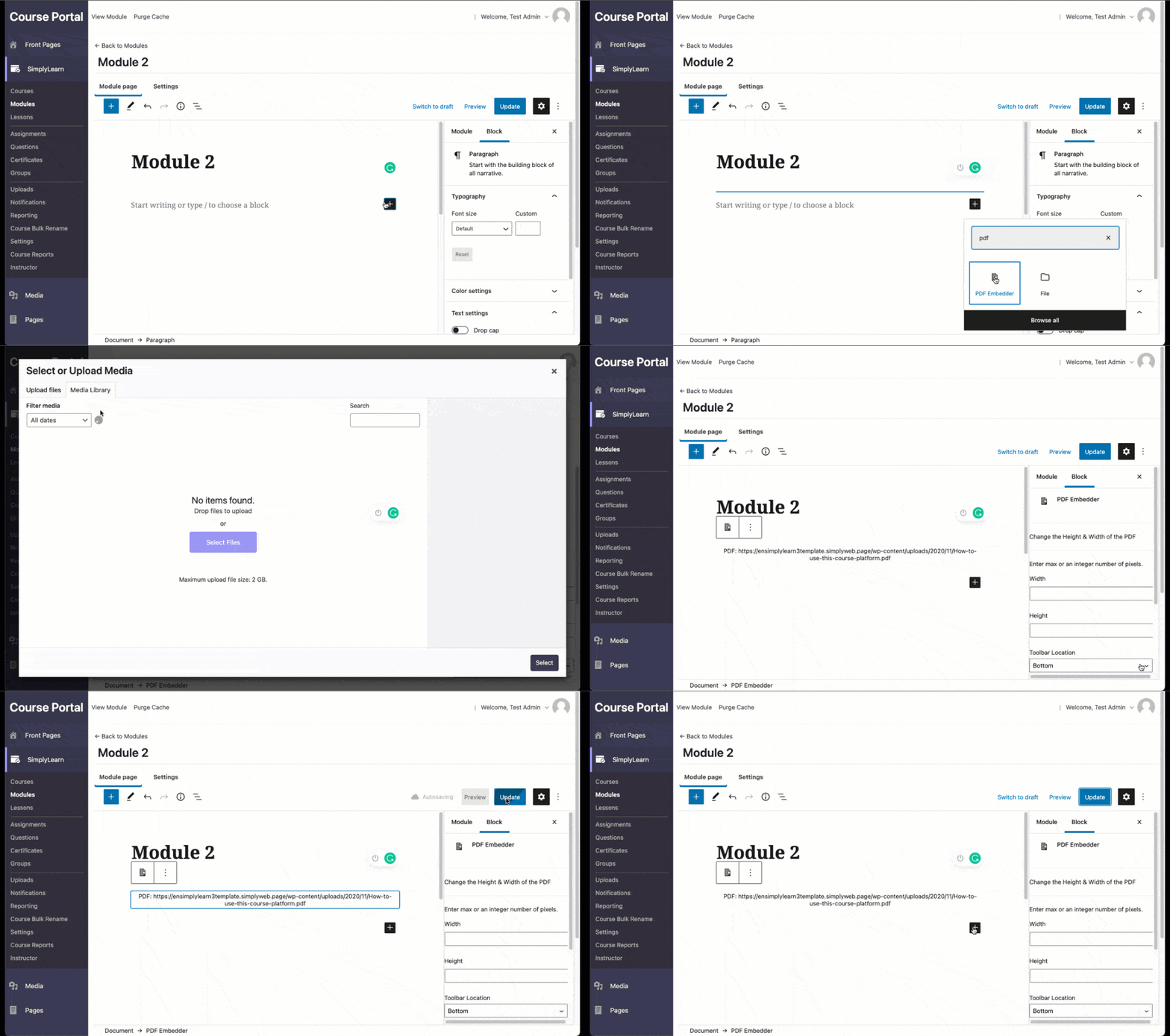
How to embed a PDF

  1. Click the plus sign
  2. Search for “PDF” 
  3. Select the block “PDF Embedder” 
  4. Upload your PDF 
  5. Finish with updating the site.

Related Articles

  • Video module overview
  • Make your Vimeo videos only available on your domain
  • How to use video progression
  • How to insert an image
  • Introduction to the block editor
  • Make the course categories part of the main menu
  • How to sell your courses
  • The group leader
  • Stripe – Frequently asked questions (FAQ)
  • The Course Builder

Try SimplyLearn

Let our team create
amazing results for you

Book a demo
Simplylearn a part of Norsk Interaktiv White

A simple and flexible
learning platform on your
own website

Case studies

Products

Contact us

[email protected]

+47 92 11 10 89


SimplyLearn AS
Postboks 1220
NO-5508 Karmsund

Terms and conditions

Privacy statement

Cookie policy

Support

Manage Cookie Consent
To provide the best experiences, we use technologies like cookies to store and/or access device information. Consenting to these technologies will allow us to process data such as browsing behaviour or unique IDs on this site. Not consenting or withdrawing consent, may adversely affect certain features and functions.
Functional Always active
The technical storage or access is strictly necessary for the legitimate purpose of enabling the use of a specific service explicitly requested by the subscriber or user, or for the sole purpose of carrying out the transmission of a communication over an electronic communications network.
Preferences
The technical storage or access is necessary for the legitimate purpose of storing preferences that are not requested by the subscriber or user.
Statistics
The technical storage or access that is used exclusively for statistical purposes. The technical storage or access that is used exclusively for anonymous statistical purposes. Without a subpoena, voluntary compliance on the part of your Internet Service Provider, or additional records from a third party, information stored or retrieved for this purpose alone cannot usually be used to identify you.
Marketing
The technical storage or access is required to create user profiles to send advertising, or to track the user on a website or across several websites for similar marketing purposes.

Manage options Manage services Manage {vendor_count} vendors Read more about these purposes
View preferences
{title} {title} {title}